

|
      |
|
|
|

|
|
|
|
Models: |
|
Vetra USB Protocol Converters can
be used in many applications to connect RS-232 data sources to
PCs, iMACs and other computers equipped with an USB port. The
RS-232 ASCII coded data appears as keyboard input to the PC.
Industrial control, point-of-sale, bar code readers, instrumentation,
structured test, compatibility test, and data acquisition are
some of the many areas where Vetra Protocol Converters have found
effective application. The USB-331 is powered by the PC's USB
port, so no external power supply is required. To connect additional keyboards, use a hub, another USB port on the PC, or use the Vetra USB-335 protocol and code converter with on-board 2-port hub. Compared to the VIP-335 Protocol Converter for PC PS/2 keyboard input, the USB-331 takes advantage of the higher input rate of the standard USB keyboard input, which can be 750 characters per second. The available Extra Speed Option of the USB-331 raises the input rate to 3000 characters per second. Burst-oriented applications, such as bar code wands and bar code readers are likely to benefit from the high USB character rate. For an Application Note with more information on character rates click here for HTML format or here for PDF format. |
Description:The USB-331 SmartPipe™ Protocol
and Code Converter allows RS-232 data to be fed directly into
a USB port as keyboard data. The standard ASCII code set, common
in RS-232 applications, does not correspond to the codes of the
standard USB keyboard, requiring translation between ASCII and
USB keyboard codes. The Vetra USB-331 Protocol Converter performs
these ASCII code to USB keyboard code translations. Additional
keyboards can be connected through an unused USB port on the
computer, or via a hub. Or, use the USB-335
model with an on-board 2-port hub.The connection of a standard
keyboard is optional and not necessary for the USB-331 to operate. |
Features:
|
 |
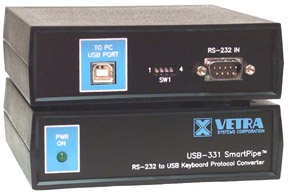
Connections:A standard USB Type
A-B cable, provided with the unit, is used to connect the USB-331
converter to a USB port of the PC or MAC (no cable is provided with the USB-331-OEM). The USB port can be
directly on the computer or on a hub connected to the computer.
A cable terminated in a standard DB-9 female connector is required
to interface RS-232 data to the converter. Vetra offers a selection of DB-9 cables, see Accessories. Dimensions for the USB-331 Protocol Converter are 1.5 in H x 5.08 in W x 5.25 in D (3.81 cm x 12.90 cm x 13.34 cm). For dimension data for the USB-331-OEM click here. The USB-331 is powered by the PC's USB port, so no external power supply is required. The housing is molded of black GE Cycolac-T, a high impact ABS material, and is internally shielded with an acrylic base nickel coating for RFI attenuation. Front and rear panels are fabricated from .062 in thick aluminium and finished with low gloss black paint. FCC and CE marked. Shipping weight is less than 2 lbs per unit. |
| Environmental |
Operating Temp: Storage Temp: |
5 to 104 deg. F
(-15 - 40 deg. C) -4 to 122 deg. F (-20 - 50 deg. C) |
| Supported Hardware |
Computer: |
Any computer with a USB port |
|
The USB-331 Protocol Converter uses
technology protected by US Patent 7,299,309 SmartPipe is a trademark of Vetra Systems Corporation Copyright © 1995-2010 by Vetra Systems Corporation, All Rights Reserved |
||
For user instructions in PDF format.
 For a copy of Adobe's Acrobat® Reader".
 |
Limited 3 Year Warranty |
|
|
|
|
|
|
|
|
|
|
|
|
|
|
|
|
|
|
|
|
|
|
|
|
|
275 Marcus Blvd. Ste-J, Hauppauge, NY 11788-2022 USA Toll Free 1-800-537-9296 Tel: 631-434-3185 Fax: 631-434-3516 e-mail: sales@vetra.com |

